GA4 · V-Belt Supply
V-Belt Supply Magento Tracking: GA4 and GTM
Magento GA4 and GTM tracking with ecommerce events, checkout funnels, Clarity heatmaps and first-party tagging.
Ecommerce events, checkout funnels, remarketing audiences and first-party tagging configured
USA
V-Belt Supply
Industrial ecommerce
Magento
GA4 + GTM Tracking

What Tracking Problem Did V-Belt Supply Have?
V-Belt Supply required Magento ecommerce tracking that connected product interactions, cart activity, checkout steps, purchase events and search behavior to GA4 through Google Tag Manager.
The existing measurement setup retained legacy tags, while the new implementation added a dedicated event structure for ecommerce reporting, funnel analysis, remarketing audiences and user behavior review.
What Tracking Setup Was Implemented?
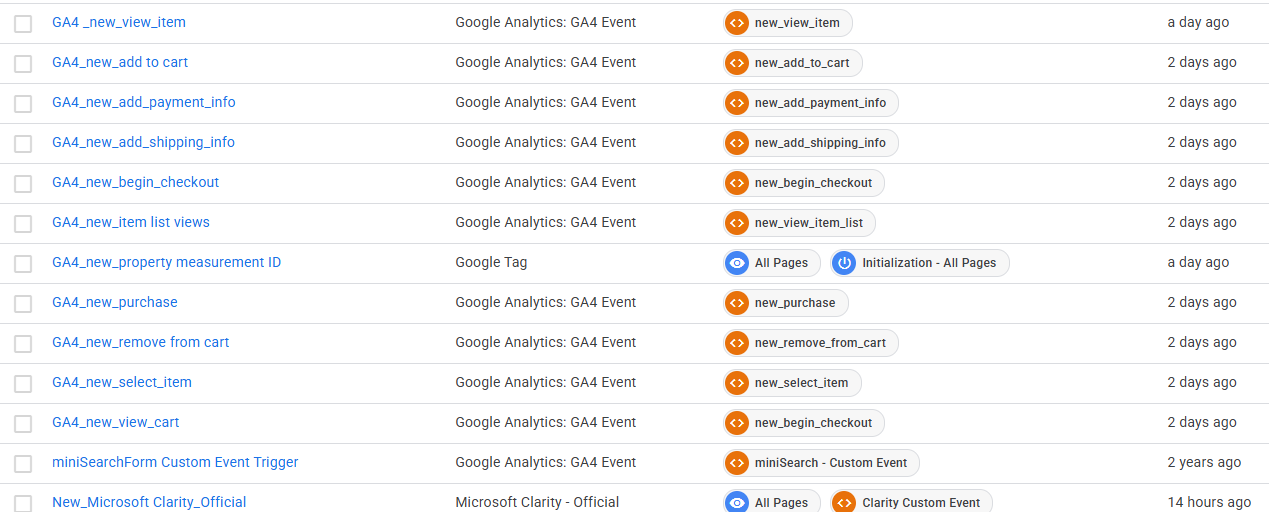
The setup connected Magento to GA4 through GTM with separate tags, triggers and data layer events for each tracked action across the buying path.
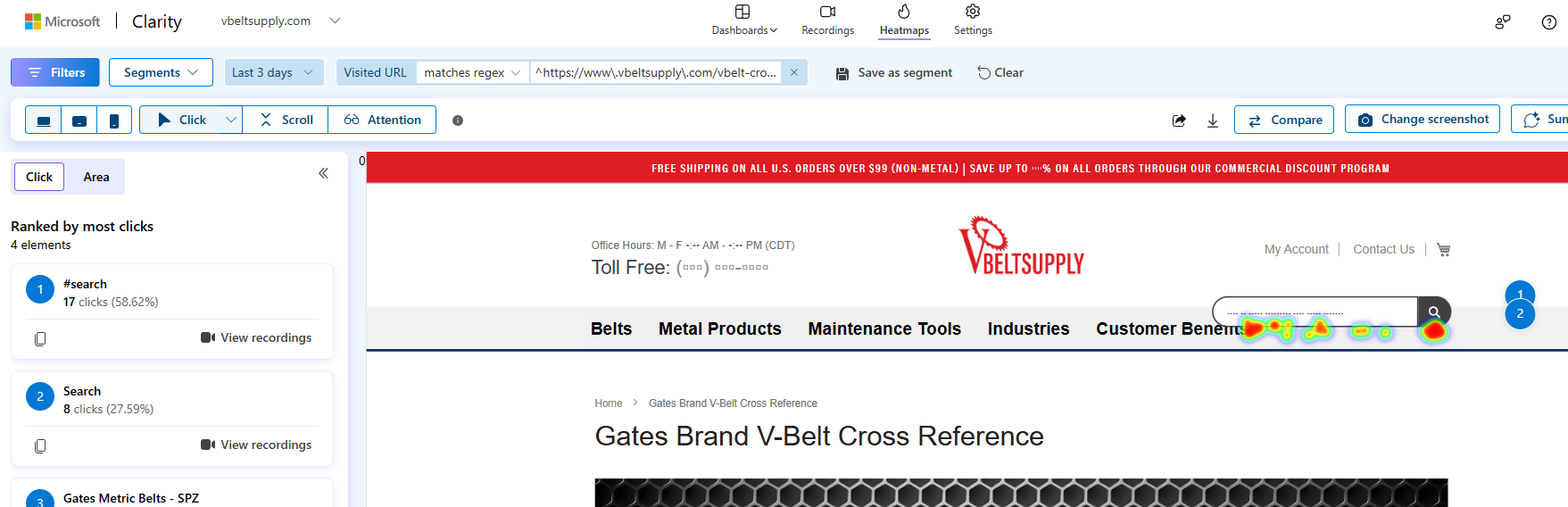
New GA4 event tags were deployed for ecommerce interactions, Microsoft Clarity was added for heatmap analysis and first-party tagging was configured through Cloudflare to improve measurement continuity for ad-blocked traffic.
Which Ecommerce Events Were Configured?
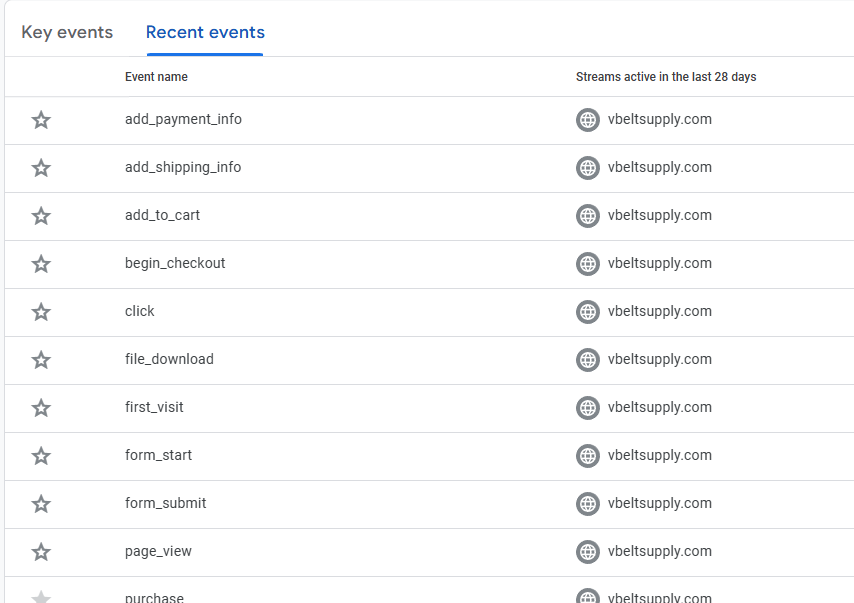
Event tracking covered product discovery, cart movement, checkout progression, purchase completion, form activity and internal site search using GA4 event names.
- view_item: product detail page measurement.
- view_item_list: product list view tracking.
- select_item: product selection event.
- view_cart: cart view measurement.
- add_to_cart: cart addition event.
- remove_from_cart: cart removal event.
- begin_checkout: checkout start event.
- add_shipping_info: shipping step completion.
- add_payment_info: payment step completion.
- purchase: completed order event.
- form_start and form_submit: form interaction tracking.
- search: internal search function tracking.
How Were Checkout And Purchase Funnels Configured?
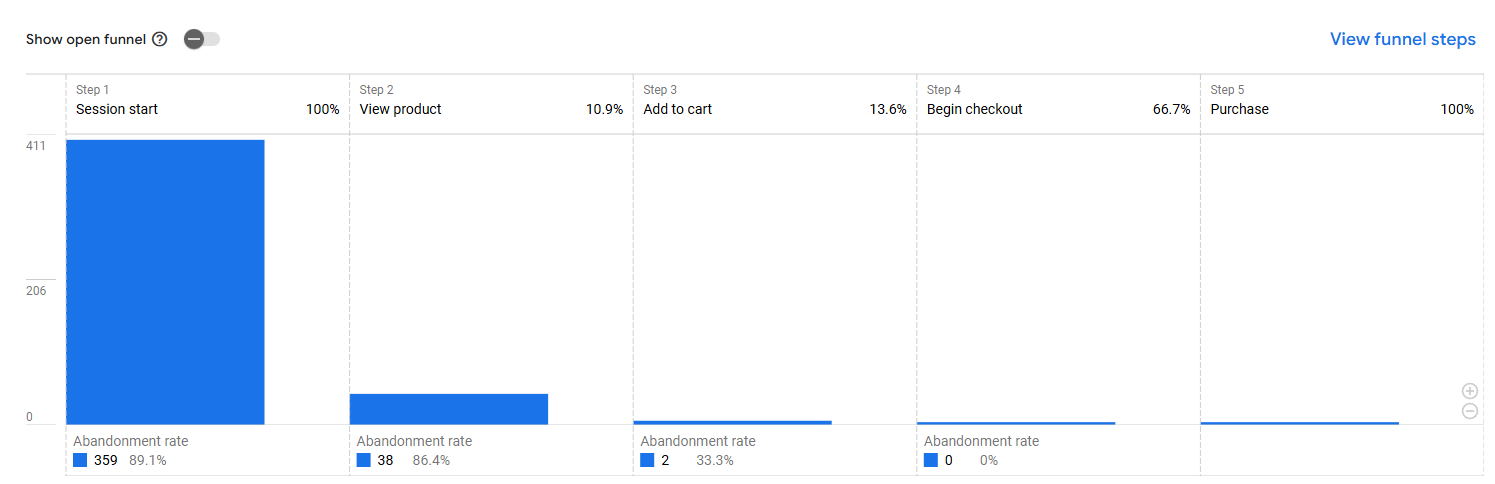
GA4 funnel reports were configured to show movement from session start to product view, cart addition, checkout start and purchase completion.
- Purchase funnel: session start, view product, add to cart, begin checkout and purchase.
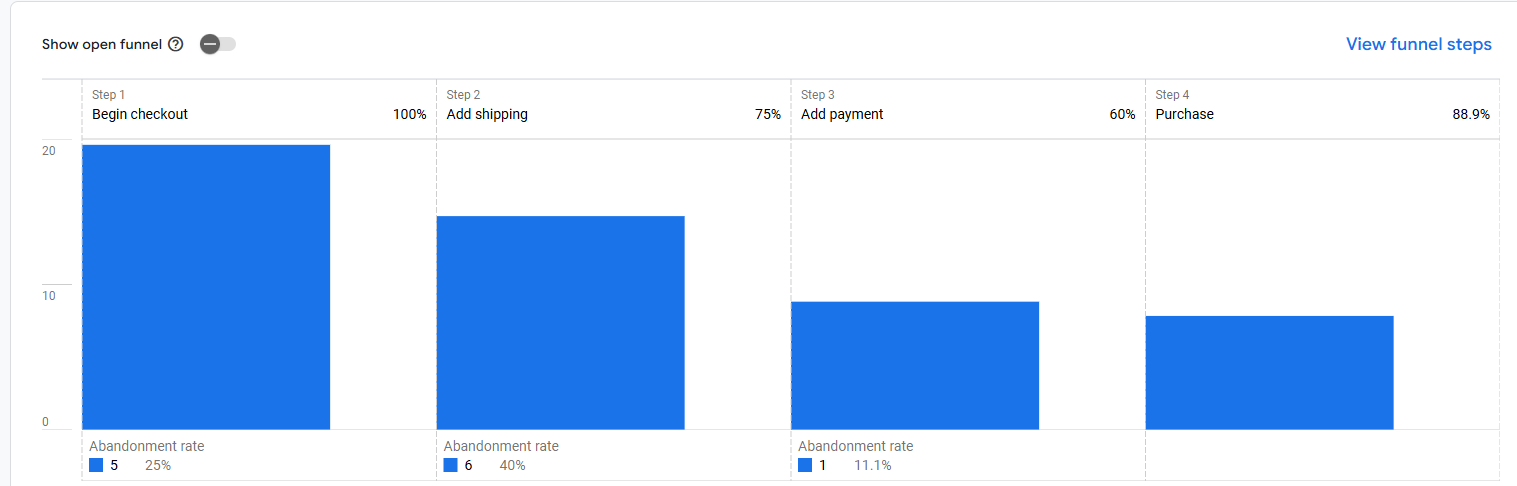
- Checkout funnel: begin checkout, add shipping, add payment and purchase.
- Abandonment reporting: step-level drop-off visibility for ecommerce analysis.
How Was Purchase Tracking Validated?
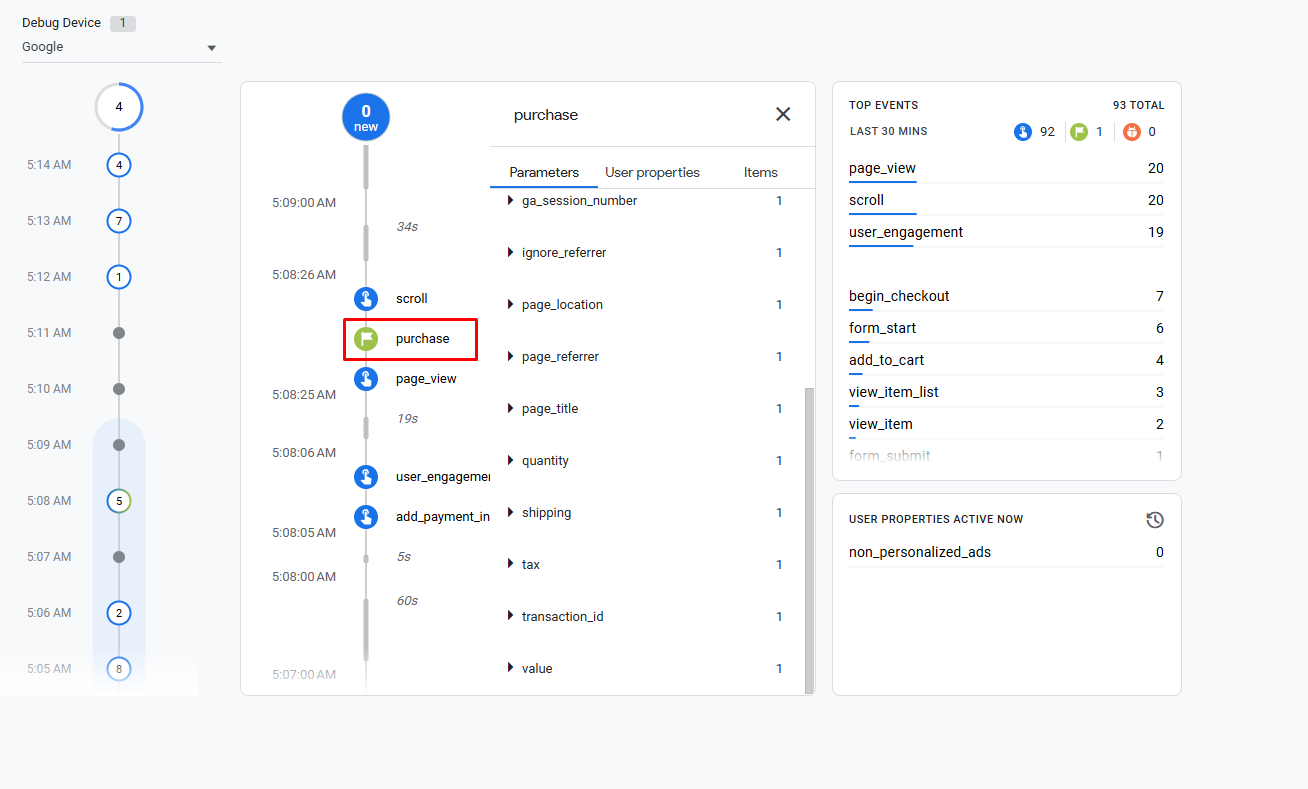
Purchase tracking was validated in GA4 DebugView by confirming the purchase event, supporting checkout events and ecommerce parameters during a live test session.
DebugView showed page_view, scroll, user_engagement, add_payment_info, begin_checkout, add_to_cart, view_item_list, view_item and form_submit activity in the same validation window.
What Remarketing Audiences Were Created?
GA4 audiences were created for remarketing and behavior segmentation based on purchase status, inactivity and demographic availability.
- Purchasers: users with completed purchase activity.
- Non-purchasers: users who visited without purchase activity.
- 7-day inactive users: previously active visitors who did not return.
- All users: complete visitor audience for broad campaign segmentation.
- Male and Female segments: demographic audiences when Google Signals data is available.
What Data Collection Settings Were Configured?
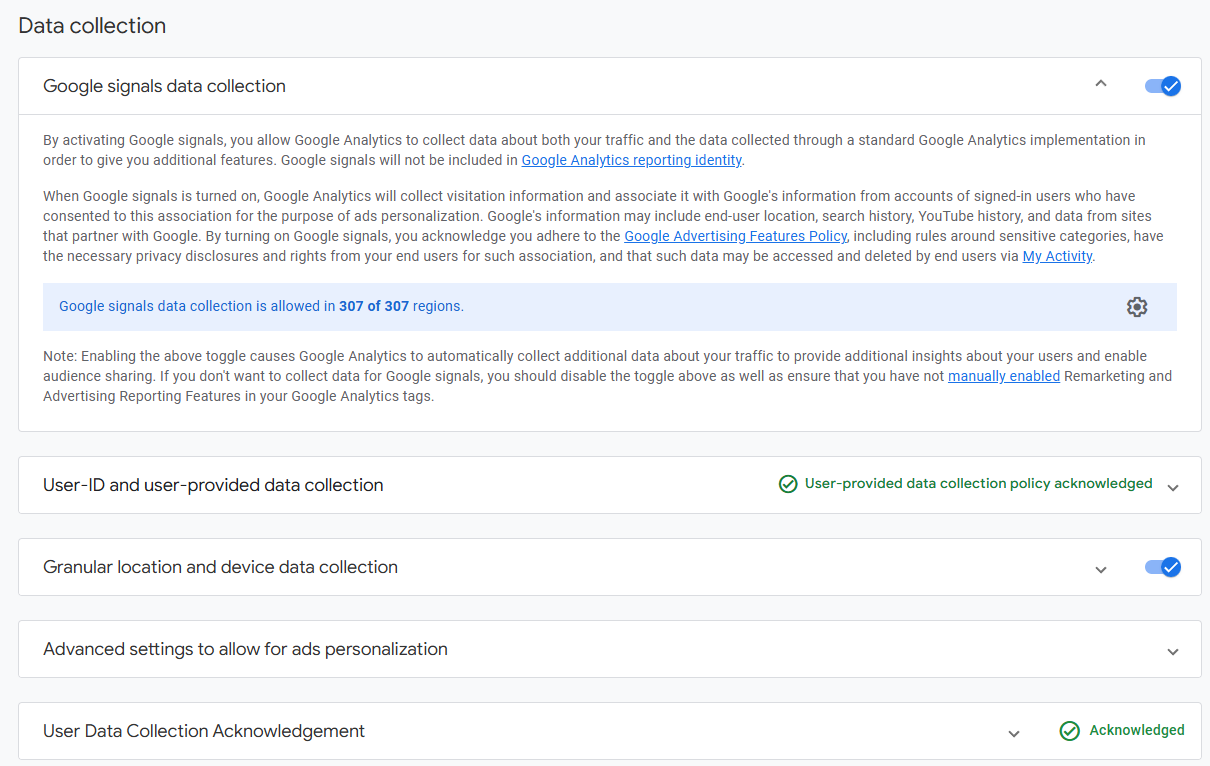
GA4 data collection settings were configured for audience creation, demographic reporting, device reporting and consent-aware user-provided data collection.
- Google Signals: enabled for cross-device reporting and eligible demographics.
- User-provided data collection: policy acknowledgement completed for enhanced measurement support.
- Granular location and device data: enabled for geographic and device reporting.
- Ads personalization settings: configured for audience and remarketing use cases.
What Additional Analytics Tools Were Connected?
Microsoft Clarity and Google Search Console were connected alongside GA4 to extend user behavior analysis and organic search reporting.
- Microsoft Clarity: deployed through GTM for heatmap and session recording analysis.
- Google Search Console: linked with GA4 to connect organic search performance with onsite engagement.
- Cloudflare first-party tagging: configured so measurement requests route through the site domain.
What Did The Tracking Implementation Deliver?
The implementation delivered Magento ecommerce measurement, GA4 key event tracking, checkout funnel visibility, remarketing audiences, Clarity behavior analysis and first-party tagging support.
- Connected Magento ecommerce actions to GA4 through Google Tag Manager.
- Configured purchase as a GA4 key event for conversion measurement.
- Built purchase and checkout funnel reports for ecommerce analysis.
- Created remarketing audiences for purchase status and visitor activity.
- Enabled Google Signals, user-provided data settings and granular device reporting.
- Integrated Microsoft Clarity for heatmap and session recording review.
- Linked Google Search Console to combine search data with GA4 behavior reporting.
- Configured Cloudflare first-party tagging for improved tracking continuity.